

The first time you use a good AI agent, it feels a little unfair.
You ask it to explain a market, draft a customer email, outline a product idea, or clean up a messy plan, and it comes back with something that would have taken you half the morning. Not perfect, but close enough to make you sit back for a second.
Then, almost immediately, you hit the wall.
You ask, "What is the status of the Hollis deal?"
The agent gives you a beautiful answer about how to evaluate deal health in general. It may even list the right things to check: last touch, deal stage, objections, next meeting, decision maker, close date. Very polished. Completely useless.
It does not know the Hollis deal. It has never seen your CRM. Nobody gave it a login.
So you try another angle. "Fine. Write up the weekly pipeline briefing."
Now it has enough general knowledge to be dangerous. It produces a neat report with headings, bullets, and just enough confidence to look real at a glance. But it is not your briefing. It does not lead with the three deals closing soonest. It does not call out stuck opportunities the way your team does. It does not know that your account managers insist on next action, owner, and customer mood in every section because those are the details that keep Monday from turning into theater.
Ask again tomorrow and the format shifts. A little more formal. A little more cheerful. A little less useful. That is not because the agent is broken. It is because it is still a brilliant new hire standing in the lobby, smiling, holding no badge, and guessing at the company culture.
This is the real moment in learning to use agents. Not the demo moment. The next moment. The moment you realize the agent is not a magic employee. It is a capable employee who needs onboarding.
Every useful agent eventually needs two upgrades: access to the systems where the work lives and the operating know-how for how your team does the work.
That is the whole MCP vs. Skills conversation. One is the keycard. The other is the playbook.
AI people call this context engineering. Prompting is asking a good question. Context engineering is making sure the right files, permissions, examples, tools, rules, and receipts are already on the desk before the model answers.
MCP is the keycard
The first upgrade is access.
MCP stands for Model Context Protocol. The name sounds like it escaped from an architecture review, but the idea is ordinary: it is a standard way for an AI assistant to reach the systems where the business actually happens.
Your CRM. Your calendar. Your ticket queue. Your order database. Your knowledge base. The places where yesterday's training data is not enough because the answer changed fifteen minutes ago.
Before MCP, extending an agent usually meant choosing between two bad jobs. Either your team built a custom integration for every AI tool and every business system, or a human became the courier: export the rows, paste the notes, upload the file, explain which parts are current, and hope nothing private came along for the ride.
That copy-paste phase feels harmless at first. It is also where agent work quietly becomes clerical work wearing a futuristic hat. The human is still doing the gathering. The agent is just writing prettier sentences after the fact.
An MCP server changes the shape of the job. It gives the AI a controlled menu: look up this customer, list today's tickets, find overdue invoices, book the meeting. You decide what is on the menu. Read-only? Only certain records? Only certain actions? That is the point. The keycard opens exactly the doors you choose, and it can log who went through and when.
Figure 1 · How MCP works
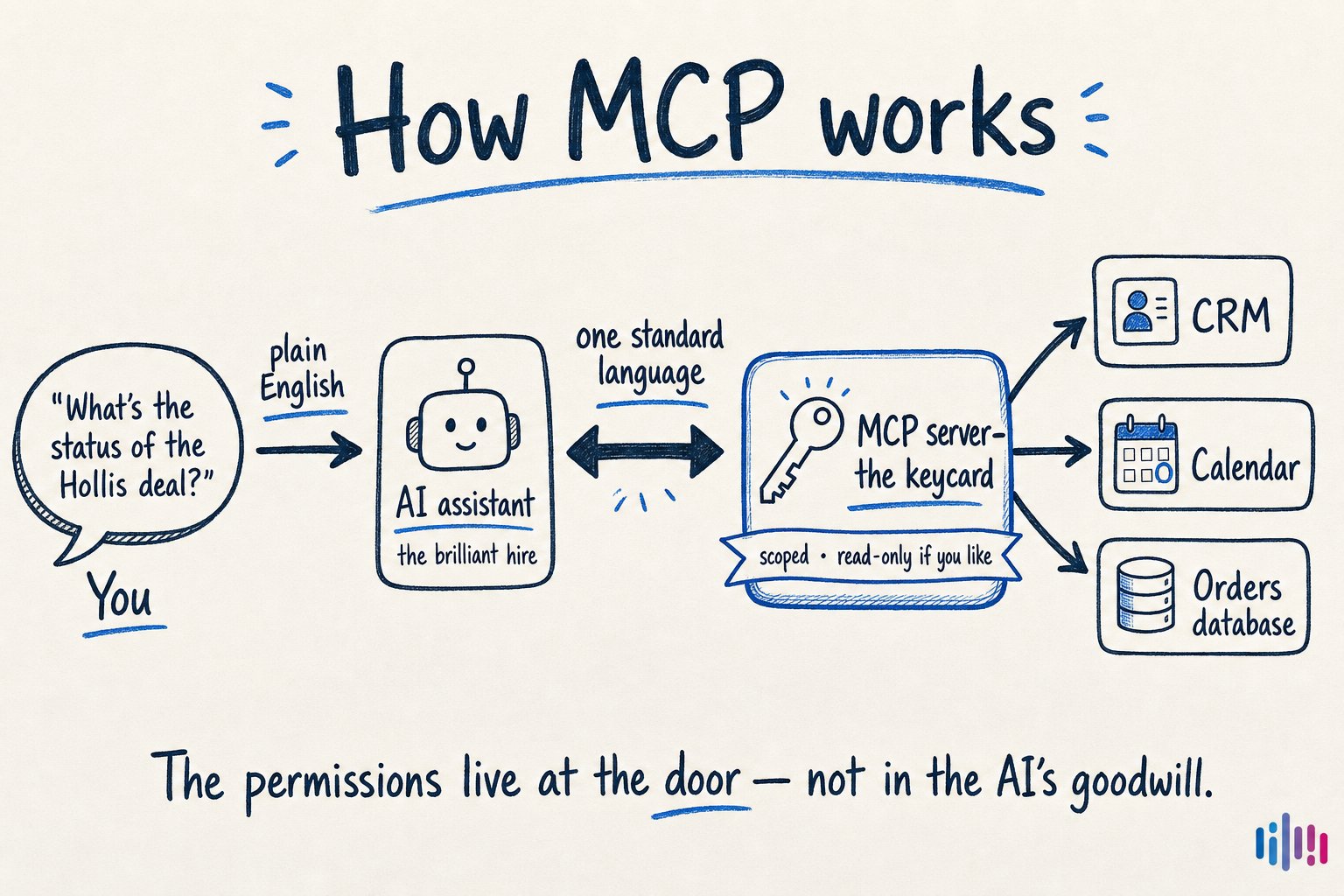
One standard connection replaces custom plumbing for every tool-and-AI pairing. The assistant asks in a common language; the MCP server translates, checks permissions, and gets the live answer.
This is where the agent starts feeling less like a chatbot and more like a teammate with a workstation.
You do not ask, "Here is a CSV, please summarize it." You ask, "Which deals changed since Friday?" The agent goes to the source. You do not ask, "Here are the open tickets I copied out of the help desk." You ask, "What are customers complaining about this morning?" The agent checks the current queue.
The difference is not cosmetic. Live access changes the kinds of questions you are willing to ask. You stop designing prompts around what you have already pasted into the window. You start asking about the business as it exists right now.
An agent without MCP can reason about the work you bring to it. An agent with MCP can reach into approved systems and gather the work itself. That is the move from assistant-as-writer to assistant-as-operator.
But access has a trap: once the agent can reach things, everyone starts expecting it to do the work correctly. And that exposes the second gap.
Skills are the playbook
The second upgrade is know-how.
This is the part people underestimate because it does not look as technical as connecting a CRM. It looks like writing things down. That makes it seem small. It is not small.
A Skill is a small folder with a plain-language instruction file that tells the AI how to do one specific job your way. Not "be helpful." Not "write better." A real task: prepare the Monday pipeline briefing, summarize a customer account, audit a CloseBot flow, draft a launch email in the house style.
The best skills feel like the notes a great manager would give a new employee: start here, ignore that, use this template, check these edge cases, never ship without this section, when in doubt ask for the missing number.
If the task needs a checklist, a template, or a helper script, those can ride along in the same folder. The AI does not need every playbook open at once. It keeps the names and short descriptions nearby, then loads the full instructions only when the request matches.
Figure 2 · Anatomy of a skill
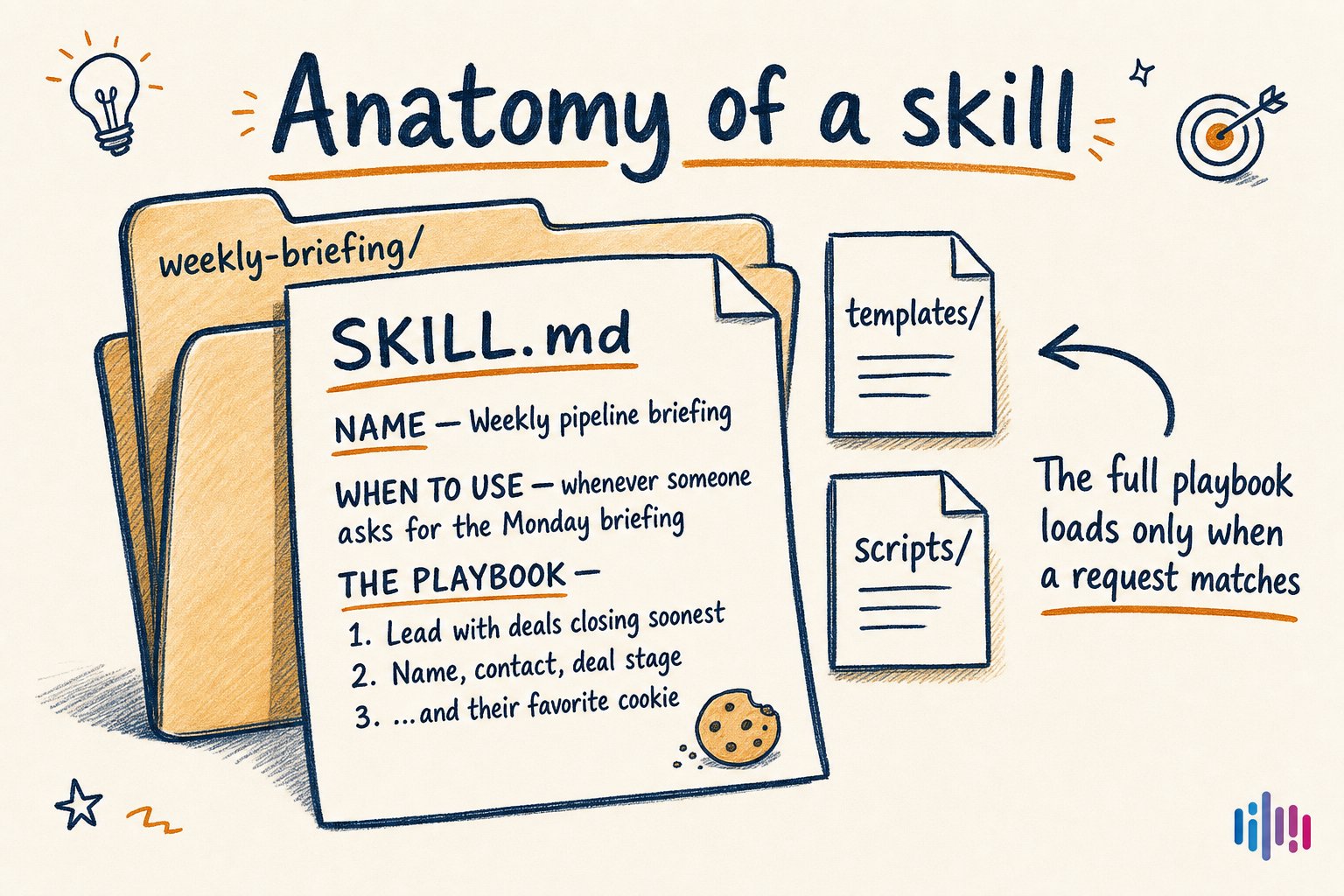
A skill is the operating note you wish every new teammate read before doing the job. The best first skill is usually the instruction you are tired of re-explaining every week.
This matters because AI is an improvising machine. That is useful when you are exploring. It is maddening when you need the same briefing format every Monday.
Without a skill, the agent keeps rediscovering the task from scratch. It may be smart, but it has no memory of your standards. It does not know which sections your team actually reads, which metrics are vanity metrics, which tone works with your customers, or which exceptions deserve a human handoff.
With a skill, "the way we do this" stops living in one person's head or in a prompt someone keeps pasting from an old note. It becomes an artifact. Your team can improve it. A new hire can read it. The agent can load it when needed. The work gets less mystical and more repeatable.
An agent without a Skill can produce a plausible version of the task. An agent with a Skill can produce your version of the task, with the steps, format, and judgment your team expects.
So which one do you need?
Two questions settle it almost every time.
Figure 3 · The two-question decision guide
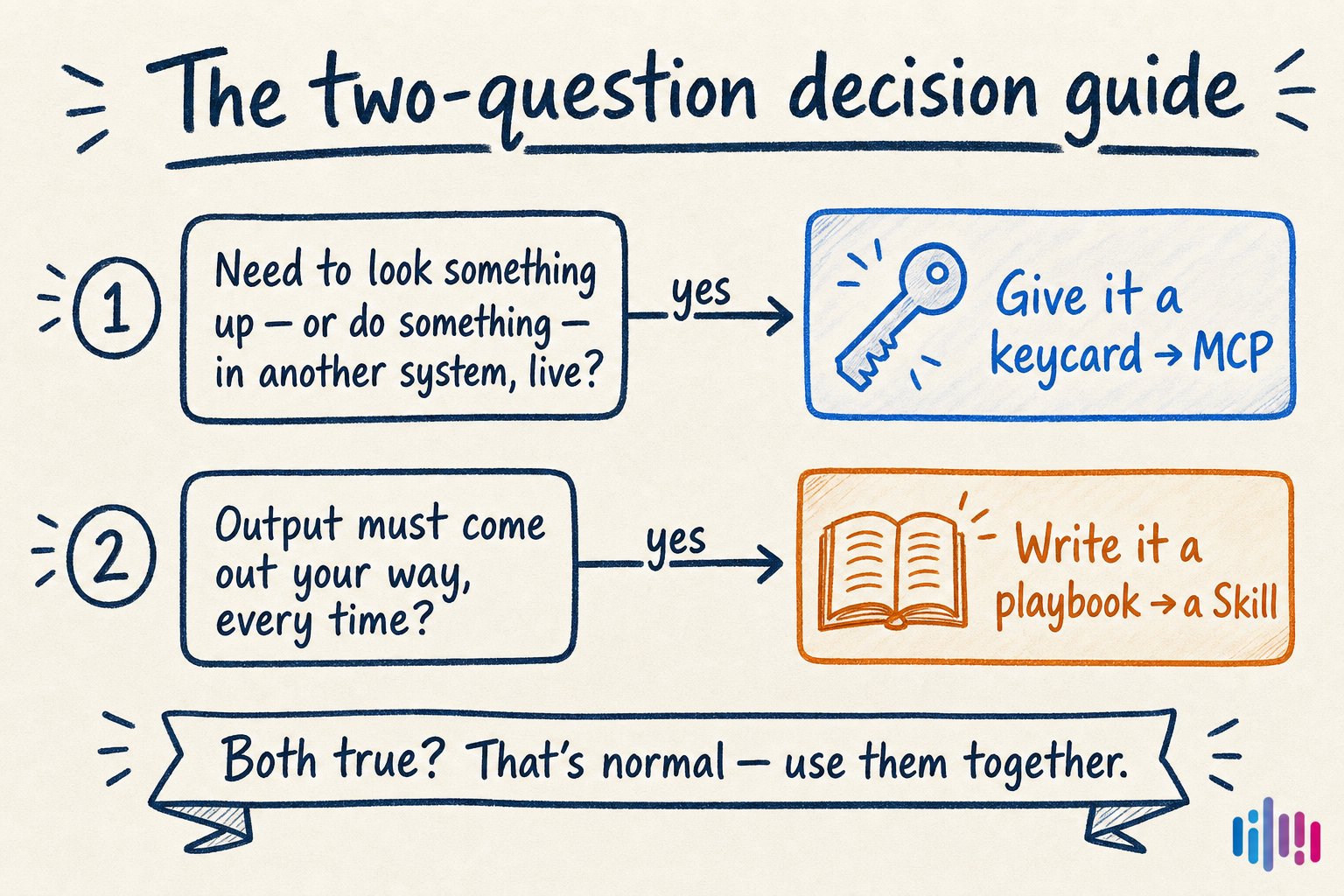
If a question is about reaching information or systems, that is MCP. If it is about how the work should be done, that is a Skill. Real workflows usually answer yes twice.
| Question | MCP: the keycard | Skill: the playbook |
|---|---|---|
| In one sentence | A secure, standard connection between an AI assistant and live systems. | A reusable set of instructions for doing one job your way. |
| Best for | CRM lookups, calendar actions, tickets, orders, inventory, current customer data. | Reports, checklists, standard procedures, house voice, repeatable analysis. |
| Watch out for | Every connector is a door. Permissions, logs, and scope matter. | A playbook cannot fetch live data by itself, and stale instructions create stale work. |
| Setup effort | Usually an afternoon to a few days, depending on auth and permissions. | Often minutes. If you can write a good onboarding note, you can write the first version. |
Most useful workflows answer yes twice. The keycard brings the facts in. The playbook shapes what goes out. Neither one does the other's job.
That last sentence is the part worth keeping close. MCP does not teach taste, sequence, or standards. A Skill does not magically fetch the live customer record. When people argue about which one matters more, they are usually standing in two different parts of the same workflow.
If the failure is "the agent does not know what is happening," you probably need access. If the failure is "the agent knows the facts but keeps doing the work in a different shape," you probably need a playbook. If the failure is "I still do not trust this enough to use it every week," you probably need both.
Monday, 8:00 a.m.
Here is the version that finally feels like a real employee instead of a clever demo.
You open your AI assistant before the first meeting. You do not prepare a data packet. You do not export a report. You do not paste yesterday's notes and then apologize for what might be stale.
You just ask:
"Prep my Monday pipeline briefing."
- You ask. "Prep my Monday pipeline briefing." That is the whole request.
- The playbook opens. The request matches the weekly briefing skill. The assistant loads the rules: lead with closing deals, show the next move, keep the format tight.
- The keycard swipes. Following the playbook, the assistant calls the CRM through MCP and pulls the live deal data it is allowed to see.
- The briefing lands. Current facts, your format, same rhythm every Monday. That is not magic. That is access plus know-how.
The first time this works, it is oddly quiet. No fireworks. No big reveal. Just the thing you wanted, in the shape you expected, using facts you did not have to gather by hand.
That quietness is the point. Good agent workflows do not feel like you are operating a machine. They feel like the machine finally understands the job.
The capability loop
This is how teams get better with agents. Not by waiting for a giant platform rollout. By extending the agent one real workflow at a time.
First, notice the repeated pain. What are you still copying, reformatting, checking, or explaining every week?
Second, separate the two problems. Is the agent missing access to live facts? That points toward MCP. Is it missing your method, format, or judgment? That points toward a Skill.
Third, make the smallest useful extension. Do not connect every system. Connect the one lookup that keeps blocking the work. Do not write a hundred-page manual. Write the six instructions that would stop the agent from wandering.
Fourth, run the workflow for real. Not on a toy example. On Monday morning, with messy records, missing fields, and the awkward edge cases that make business software hum under its breath.
Then improve the keycard or the playbook based on what happened.
If you have to paste the same context into the agent three times, that context wants to become access, a Skill, or both. Repetition is the flare. Follow it.
Where I would start
Start with a Skill.
That may sound backward after all this talk about live systems, but a skill is usually the fastest way to feel the shape of the work. Pick the instruction you are tired of repeating: how to write the weekly update, how to review a lead, how to summarize a customer, how to prepare a proposal, how to triage a support thread.
Write the playbook badly at first. Seriously. The first version can be a rough note with the steps in order. Use it. Watch where the agent drifts. Add the missing rule. Remove the sentence nobody needs. Add a tiny example. This is not a stone tablet. It is operating knowledge becoming visible.
Then add MCP where the copy-paste hurts most. The CRM you keep exporting. The spreadsheet that keeps going stale. The support queue nobody wants to summarize by hand. The calendar lookup that turns every scheduling request into three tabs and a small sigh.
That combination is where the agent starts growing with you. A new Skill teaches it another job. A new MCP tool gives it another approved reach. Over time, the assistant stops being a blank chat box and starts becoming a real work surface for the company.
The mistake is thinking this is a choice between two technologies. It is not. It is the difference between handing your new hire a keycard and handing them the way your company works. Real teams give people both.
Bottom line
MCP answers, "What can the AI reach?" Skills answer, "How should the AI work once it gets there?" If your AI feels impressive but unreliable, one of those two is usually missing.
Back to Real Wave Blog